
Browser Native Spellcheck Suppression & Firefox Double Underline Elimination
Proofreading publications requires clear, distraction-free visual feedback. Open Publisher features a custom, publication-grade proofing engine that renders crisp red wavy underlines for spelling mistakes and gentle green wavy underlines for grammatical and punctuation suggestions. However, in Mozilla Firefox, users noticed duplicate red squiggly underlines beneath misspelled words. This visual stutter occurred because Firefox ran its native browser spellchecker simultaneously alongside Open Publisher's custom proofing engine. Version 5.7.6 introduced a dual-layer suppression architecture that completely eliminates native browser underlines while preserving the app's advanced proofing engine.
🔍High-Contrast In-App Proofing Highlights in Firefox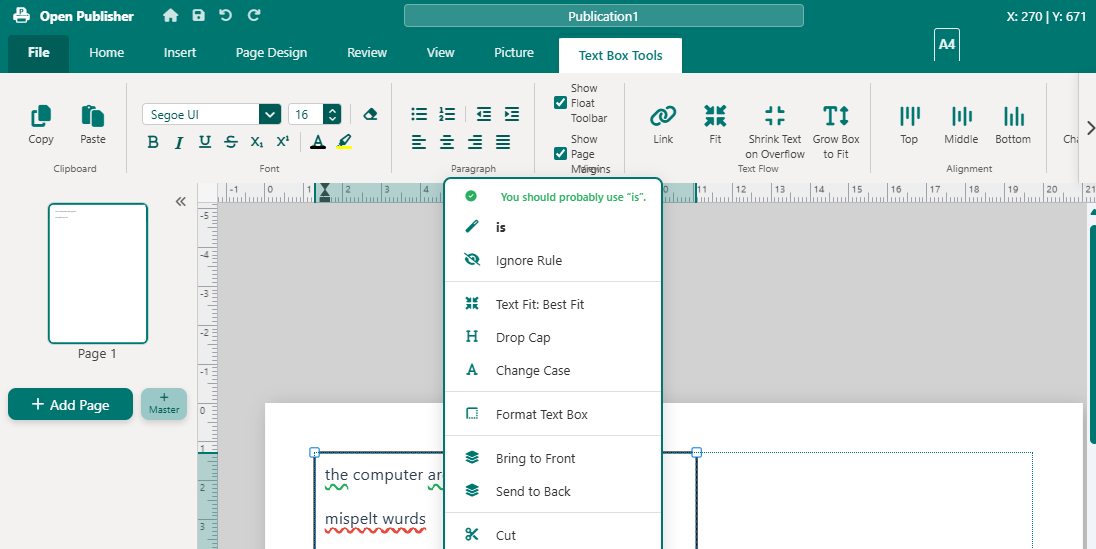 Misspelled words render with a single high-contrast red wavy underline across all browser engines and zoom levels.
The Browser Discrepancy & Firefox Duplicate Underlines
The root cause of the duplicate underline bug originated from divergent browser behavior inside transformed canvas containers:
-
Chromium Container Behavior: Chromium-based browsers (Chrome, Edge, NW.js, Opera, Vivaldi) automatically suppress native browser spellcheck marks on editable elements placed inside CSS-transformed or scaled containers (such as Open Publisher's canvas zoom container). As a result, only Open Publisher's custom highlights rendered in Chromium.
-
Gecko Transform Rendering: Firefox (Gecko) does not suppress native spellcheck inside transformed containers. Because <body spellcheck="true"> was originally enabled, Firefox's native Hunspell dictionary ran concurrently with Open Publisher's proofing engine, drawing two conflicting wavy lines under misspelled words.
Dual-Layer Suppression Architecture
Version 5.7.6 implemented an ironclad two-tier defense across the Document Object Model and CSS styling:
-
DOM-Level Enforcement: Enforces spellcheck="false" globally on the document <body> in index.html, on boot initialization in core/boot.js, during page load in core/pages.js, and on all newly created text boxes in elements/text/text.js.
-
CSS-Level Pseudo-Element Suppression: In style.css, native browser pseudo-elements (::spelling-error and ::grammar-error) are comprehensively overridden across all selectors with text-decoration: none !important; -webkit-text-decoration: none !important;.
Decoupled In-App Proofing via data-spellcheck="false"
To prevent Open Publisher's in-app proofing engine from shutting itself down due to the global spellcheck="false" attribute, the proofing scanner was decoupled from standard HTML attributes:
-
Dedicated Opt-Out Attribute: In tools/proofing/spellcheck-engine.js, element eligibility checks now inspect data-spellcheck="false" instead of standard HTML spellcheck="false".
-
Modern CSS Custom Highlight API: The in-app proofing engine continues to paint high-contrast wavy underlines using CSS.highlights (::highlight(spelling-error) and ::highlight(grammar-error)).
-
Interactive Status Bar Toggle: Users can toggle spellcheck on and off at any time using the proofing icon in the bottom status bar, cleanly clearing or re-analyzing highlights across the document.
Tip: The CSS Custom Highlight API paints wavy proofing marks with vector precision at any zoom level without altering the DOM structure of your text boxes.