
Theme Studio 300-Theme Overhaul & Lighter Teal Catalog Navigation
Version 5.4.0 marked a milestone release for Open Publisher, delivering a comprehensive architectural overhaul of the Page Design ribbon tab and the Theme Studio Engine. Replacing bulky legacy buttons that consumed nearly 700px of ribbon width, version 5.4.0 introduced an Office-style compact preview gallery with a distinct lighter teal dropdown button, instant live search filtering, and a massive curated library of 300 production-ready themes symmetrically balanced across five design archetypes.
🏛️ 300-Theme Catalog Popover & Lighter Teal Trigger Button
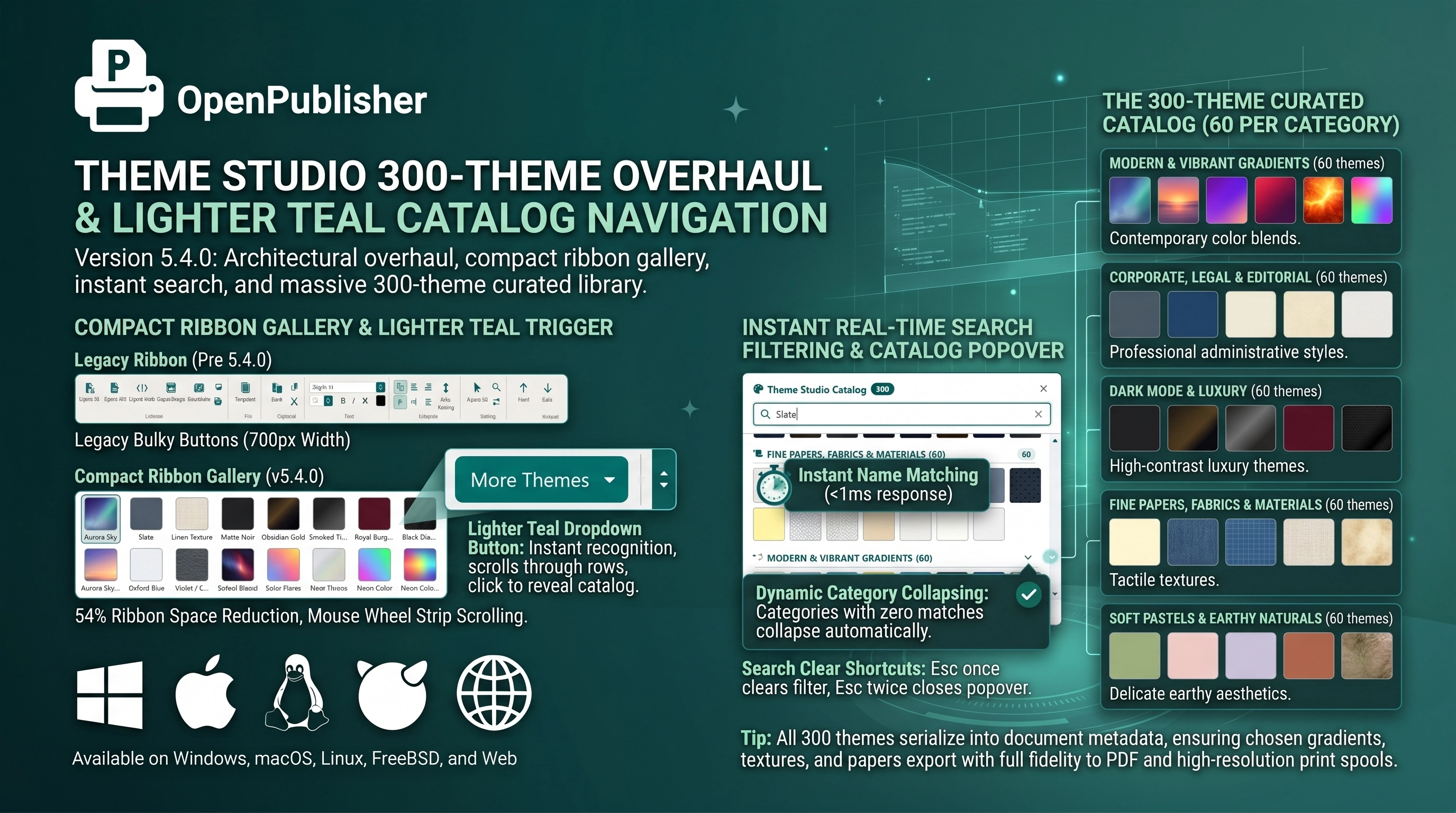 The lighter teal More Themes button reveals the 300-theme popover with real-time search filtering and category collapsing.
Compact Ribbon Gallery & Lighter Teal Trigger
The Theme Studio ribbon interface was completely redesigned for visual clarity and compact efficiency:
-
54% Ribbon Space Reduction: Replaced the old 465px swatch grid with a streamlined 216px container (194px inner viewport) that displays 16 portrait swatches simultaneously across 2 rows.
-
Lighter Teal Dropdown Button: The "More Themes" trigger (#ts-gallery-more) is styled with a distinctly lighter teal background (#007670) separated by a delicate white divider line, making the primary catalog trigger immediately recognizable against darker scroll controls (#005a55).
-
Mouse Wheel Strip Scrolling: Hovering over the ribbon gallery and rolling the mouse wheel scrolls through preview rows without clicking buttons.
Instant Real-Time Search Filtering
Navigating a massive 300-theme library requires high-performance search capabilities:
-
Instant Name Matching: As you type into the popover search field, themes filter instantly with sub-millisecond response.
-
Dynamic Category Collapsing: Categories with zero search matches collapse automatically, while matching sections display real-time match counters.
-
Search Clear Shortcuts: Pressing Escape once clears the search filter; pressing it a second time closes the catalog popover.
The 300-Theme Curated Catalog (60 per Category)
The collection was expanded from 24 to 300 authentic, production-ready themes, audited with automated verification scripts for zero duplicate IDs or display names:
-
Modern & Vibrant Gradients (60 themes): Aurora Sky, Sunset Horizon, Cosmic Violet, Crimson Ember, Solar Flare, Neon Cyberpunk, Azure Tide, Emerald Biosphere, and 52 more contemporary color blends.
-
Corporate, Legal & Editorial (60 themes): Executive Slate, Oxford Blue, Legal Ivory, Warm Parchment, Geneva Diplomat, Wall Street Tint, Kyoto Washi Wash, and 53 more professional administrative styles.
-
Dark Mode & Luxury (60 themes): Matte Noir, Obsidian Gold, Smoked Titanium, Royal Burgundy, Emerald Velvet, Black Diamond, Amethyst Noir, and 53 more high-contrast luxury themes.
-
Fine Papers, Fabrics & Materials (60 themes): Cream Paper, Denim Fabric, Blueprint Grid, Linen Texture, Aged Parchment, Japanese Rice Paper, Kraft Cardboard, and 53 more tactile textures.
-
Soft Pastels & Earthy Naturals (60 themes): Sage Matcha, Blush Rose, Lavender Mist, Terracotta Clay, Celadon Green, Honeycomb Whisper, and 54 more delicate earthy aesthetics.
Tip: All 300 themes serialize into document metadata, ensuring chosen gradients, textures, and papers export with full fidelity to PDF and high-resolution print spools.