
Visual Spell Check Engine & Status Bar Auto-Revert
Producing flawless publications requires instant, accurate proofing feedback as you compose. In earlier versions of Open Publisher, misspelled words inside canvas text boxes failed to display red squiggly underlines. While the right-click menu could fetch suggestions from LanguageTool, native browser spellcheck decorations were suppressed inside scaled canvas containers (such as the default 60% zoom view). Version 5.4.6 introduced a dedicated, high-performance Visual Spell Check Engine built on the W3C CSS Custom Highlight API (::highlight(spelling-error)), paired with an automatic status bar revert timer.
🔤Scale-Invariant Visual Spell Check Engine with Continuous Wavy Underlines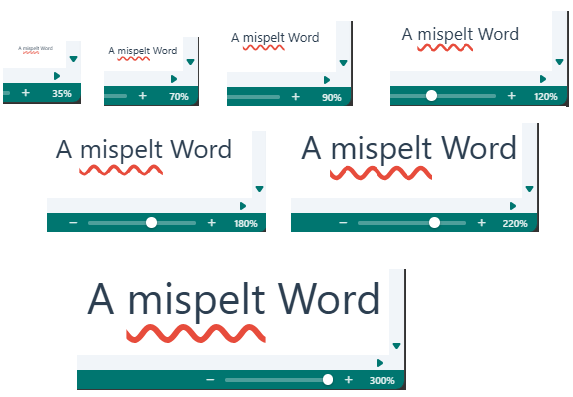 Crisp red squiggly underlines remain clearly visible across all zoom levels without breaks over character descenders.
Scale-Invariant Visual Spell Check Engine
Chromium-based browsers suppress native ::spelling-error decorations when elements reside inside CSS transformed containers (transform: scale(...)). Open Publisher resolves this with a hardware-accelerated highlighting architecture:
-
W3C CSS Custom Highlight API: Leverages CSS.highlights.set('spelling-error', highlight) to paint crisp, GPU-accelerated wavy red underlines directly through the browser compositor across any zoom level (60%, 75%, 100%, 150%, 200%).
-
Continuous Underline Coverage: Browsers default to text-decoration-skip-ink: auto, which severs underlines wherever character descenders (y, g, p, q, j) cross the baseline. Setting text-decoration-skip-ink: none !important guarantees solid, unbroken squigglies across the entire word.
-
Non-Destructive DOM Ranges: Identifies misspelled words using native DOM Range objects without touching innerHTML, without inserting wrapper span tags, and without polluting undo/redo history.
-
Persistent Selection Visibility: Unlike native browser spellcheck lines that disappear when focus leaves a field, CSS highlight underlines remain fully visible when a text box is selected as an object or right-clicked.
Smart Caching & Zero Bundled Dictionary Bloat
Bundling offline dictionaries inflates package sizes by megabytes. Open Publisher integrates seamlessly with its existing LanguageTool proofing service while maximizing local responsiveness:
-
Batch Online Verification: Queries the proofing API in batches of up to 50 unverified tokens, filtering matches specifically for spelling typos while discarding sentence capitalization rules.
-
Client-Side Memory Caching: Maintains in-memory caches (_knownGoodWords and _knownBadWords) so repeated words never trigger duplicate network calls.
-
Add to Dictionary & Ignore All: Right-clicking any flagged word provides 1-click options to add the word to your custom dictionary (persisted in localStorage) or ignore it for the session.
-
Print & Export Concealment: Dedicated @media print rules guarantee that red wavy squigglies never appear on printed output or exported PDF publications.
Status Bar Auto-Revert & Typing Reset
When moving or duplicating text chunks on the canvas, the bottom-left status bar message (#status-msg) previously remained stuck on "Text Moved" or "Text Copied" indefinitely. Version 5.4.6 added an intelligent 2.5-second auto-revert timer along with keystroke listeners, restoring "Element Selected" or "Ready" automatically upon typing resumption.
Tip: You can toggle real-time spell check on or off at any time using the Review tab in the ribbon or the Application Options dialog.