
Canvas Scratch Area Scrolling in All Directions & Floating Return Button
Professional publication layout requires a flexible, expansive pasteboard around the document. Designers frequently use the pasteboard (the "scratch area") to stage draft headlines, store alternative images, and experiment with design ideas before placing them on the active page. In standard web applications, scroll containers hit hard boundaries whenever scrolling upward or to the left of the page origin. Version 5.7.7 introduced complete four-directional scratch area scrolling across Single-Page and Multi-Page modes, boundary auto-extensions, cross-browser delta normalization, and an intelligent floating "Return to Page" button.
🧭Four-Directional Scratch Workspace with Floating Return Button
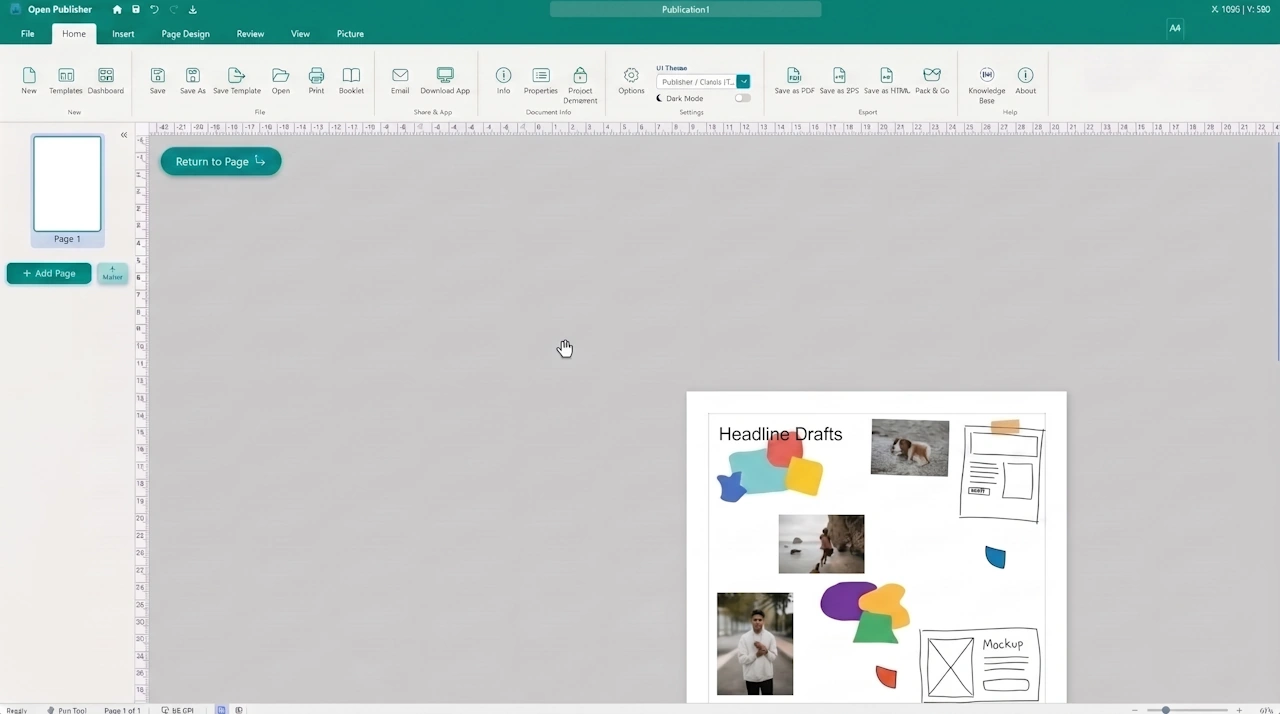 Users can scroll into the scratch area in all four directions with an intelligent directional button to return to the active page.
Four-Directional Scrolling & Hybrid Coordinate Translation
Browser scroll containers with overflow: auto enforce a hard lower bound: coordinates cannot drop below zero (scrollTop = 0, scrollLeft = 0). Any upward or leftward wheel events at the boundary are normally discarded. Version 5.7.7 engineered a hybrid scroll and translation system in canvas/canvas.js:
-
Upward Scratch Scrolling: When scrollTop <= 2 and the user scrolls upward with the mouse wheel or trackpad (deltaY < 0), the engine smoothly translates the canvas downward via style.top, opening visible pasteboard above the document.
-
Leftward Scratch Scrolling: When scrollLeft <= 2 and the user scrolls leftward (deltaX < 0), the engine translates the canvas rightward via style.left, opening visible pasteboard to the left.
-
Smooth Directional Restoration: When scrolling back toward the document, custom offsets restore cleanly to their base positions before native document scrolling engages.
-
Ruler & Guide Synchronization: In Single-Page Mode, top and left rulers (syncRulers) and margin guide overlays (syncMarginGuideOverlay) track the paper position in real time.
Multi-Page Overview Parity & Zoom Boundary Extensions
The scratch area navigation engine operates with complete parity across all document view modes:
-
Multi-Page Overview Parity: In Multi-Page Overview mode, the engine dynamically targets #multi-page-wrapper, allowing designers to pan and scroll across wide overview grids without artificial boundaries.
-
Vertical Scratch at High Zooms: Fixed an issue where canvas scrollbars refused to scroll past the bottom of the page when zoomed between 110% and 150%. The workspace guarantees at least 25% to 45% (minimum 200px) of visible scratch space below the document at all zoom factors.
-
Dynamic Boundary Auto-Extension: Canvas scroll limits automatically expand when scrolling near edge perimeters, accommodating sprawling multi-page layouts.
Cross-Browser Normalization & Floating Return Button
Version 5.7.7 guarantees an identical tactile scrolling feel across all operating systems and browsers:
-
Delta Normalization: Normalizes Firefox line-based deltaMode (deltaMode === 1) with Chromium pixel deltas (deltaMode === 0), delivering uniform scroll velocity.
-
Shift-Wheel Horizontal Navigation: Holding Shift while scrolling with the mouse wheel smoothly navigates horizontally into left and right scratch areas.
-
Directional Floating Return Button: If the user pans so far into the scratch area that the active document is completely offscreen, an elegant floating button (#floating-return-to-page-btn) appears with a directional arrow indicating where the document is located (fa-arrow-up, fa-arrow-down, fa-arrow-left, or fa-arrow-right). Clicking the button smoothly recenters the page.
Tip: You can use the Hand Tool (hold the Spacebar while dragging) to pan across the scratch workspace freely in any direction.