
Dashboard Blank Document Page Size Routing & Paper Format Synchronization
The Startup Dashboard is the central launching pad for new Open Publisher projects, offering one-click access to standard publication formats: A4, US Letter, US Legal, Tabloid, Business Cards, Posters, and Custom dimensions. However, earlier versions suffered from an aggressive overwrite defect: choosing a specific paper size from the Dashboard (such as Tabloid or Business Card) would often default back to a generic regional A4 or Letter page as soon as the main editor canvas opened. Version 4.19.6 patched the core page creation routines to ensure user-selected dashboard formats are accurately inherited and preserved.
📋Startup Dashboard Quick-Start Paper Cards & Format Synchronization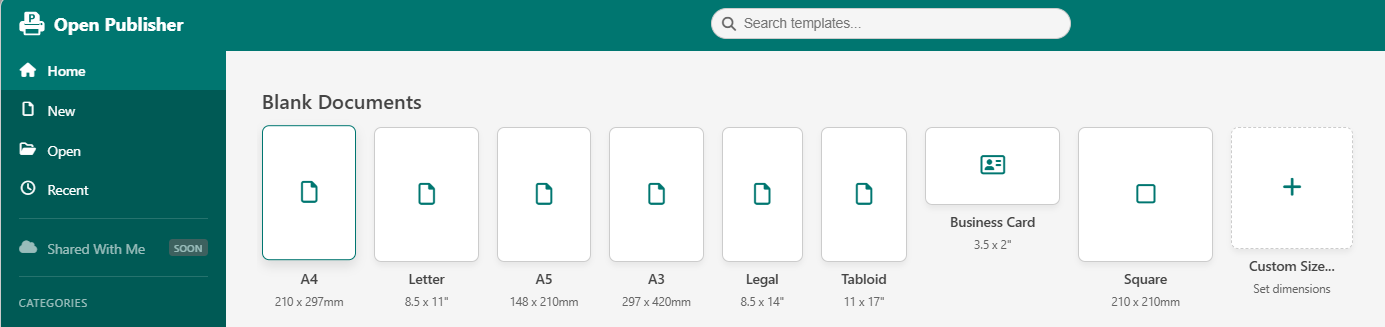 Selecting any paper size card on the Dashboard initializes the canvas with exact corresponding pixel dimensions and aspect ratios.
The addNewPage Default Dimension Overwrite Bug
The root cause of incorrect page dimensions on startup was identified in the core page creation logic:
-
The Aggressive Regional Overwrite: In core/pages.js, addNewPage() evaluated browser locale settings (navigator.language) and defaulted new pages to regional A4 or Letter sizes. When starting a document from the Dashboard, addNewPage() executed after the preset had been chosen and aggressively overwrote user selections with regional defaults.
-
Dimension Inheritance Patch: Refactored addNewPage() to inspect whether the DOM canvas container already has pre-set width and height properties applied by the Dashboard initialization sequence. If explicit dimensions exist, addNewPage() reads and respects them intact.
Multi-Page Format Consistency
Document format preservation extends across subsequent page additions:
-
Inheriting Current Page Dimensions: When inserting additional pages into an active publication (Ctrl+M), the editor duplicates the dimensions and orientation of the active page rather than reverting to standard A4/Letter defaults.
-
Specialized Format Support: Preserves dimensions for non-standard formats including Business Cards (3.5 x 2.0 in), A3 Posters, Brochures, and custom square social media banners.
Calibrated Rulers & Margin Guides
When a document initializes from the Dashboard, horizontal and vertical rulers, margin guide overlays, and canvas viewport zoom automatically calibrate to the selected format on frame zero, ensuring immediate creative productivity.
Tip: You can change the paper size or orientation of an open document at any time using the Page Setup menu in the Page Design tab.