
Clipart Border Art Engine, Dynamic Element Resizing & 40 Presets
Inspired by classic desktop publishing traditions in Microsoft Publisher, Border Art allows designers to frame pages, event certificates, flyers, and text callouts with repeating decorative clipart patterns (such as Santas, holiday bells, autumn leaves, stars, balloons, pencils, and floral borders). Version 5.7.0 delivered a major evolution of the Border Art engine, expanding the gallery to 40 handcrafted presets, introducing Dynamic Element Resizing with real-time perimeter tile recalculation, resolving print spooler aspect ratio distortion, and integrating border art directly into the text box context menu.
🎨Border Art Gallery with 40 Clipart Presets & Live Inset Sliders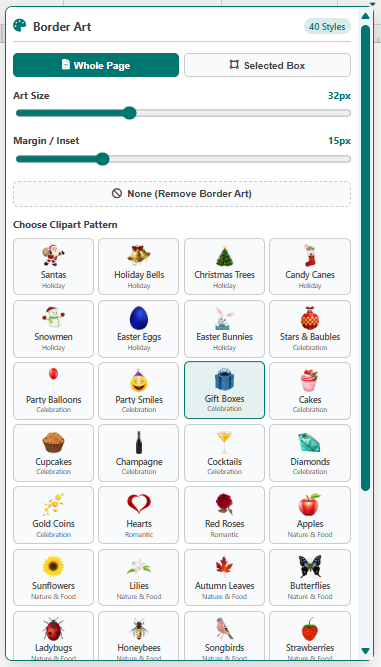 The gallery provides 40 distinct clipart borders with live size and margin sliders, constrained cleanly to 80% workspace height.
Compact 4-Wide Gallery Grid & 40 Presets
The redesigned dropdown gallery optimizes browsing efficiency across 40 distinct styles:
-
4-Column Grid System: Displays presets in a compact 410px wide menu with 28px square image previews and 11px labels across six popular themes: Holiday, Celebration, Romantic, Nature & Food, Sports, and Education.
-
80% Workspace Clearance: Clamps maximum dropdown height to 80% of available space below the ribbon (spaceBelow * 0.80), keeping canvas elements, rulers, and status bar controls visible.
-
Real-Time Sliders: Interactive sliders allow adjusting tile icon size (16px to 64px) and edge inset margins (0px to 60px) with instant visual updates.
Dynamic Element Resizing & Perimeter Math
When applying Border Art to an individual text box or shape box, borders adapt dynamically:
-
Real-Time Drag Recalculation: Resizing a box via canvas handles invokes BorderArtEngine.refreshElement(el, w, h) on every frame, dynamically adding or removing tiles along all four edges.
-
Integrated ResizeObserver: A native observer detects dimensional shifts from sidebar inputs or font scaling, updating border tiles automatically.
-
Mathematical Corner Alignment: Exact perimeter divisions guarantee that corner tiles align symmetrically at the vertices without overlapping.
Print Fidelity & Context Menu Integration
Version 5.7.0 resolved print preview flattening by appending &fit=contain to clipart CDN queries, delivering 1:1 square transparent tile containers. Right-clicking any text box now includes "Border Art..." directly below "Format Text Box", while the Format Properties dialog features a dedicated button to open the gallery anchored directly to the selected element.
Tip: You can apply Border Art to the entire page via Page Design -> Border Art, or to individual callout boxes via right-click.