
Multi-Page to Single-Page Return Auto-Focus, True Visual Centering & Zoom Preservation
Switching between a macro bird's-eye view of your entire publication and detailed single-page editing is central to multi-page publication design. Designers frequently jump into Multi-Page Overview to assess balance and page flow, then double-click a page thumbnail to resume fine-tuning. Earlier releases had a disorienting transition defect: returning to single-page mode left the viewport at the top-left pasteboard origin (scrollLeft = 0, scrollTop = 0), stranding users on blank pasteboard while the document sat hundreds of pixels to the right. Additionally, single-page editing zoom was lost. Version 5.7.9 introduced an automated return pipeline featuring true visual centering, instant transitions, and zoom level preservation.
🎯Instant View Mode Transition with Centered Page Focus
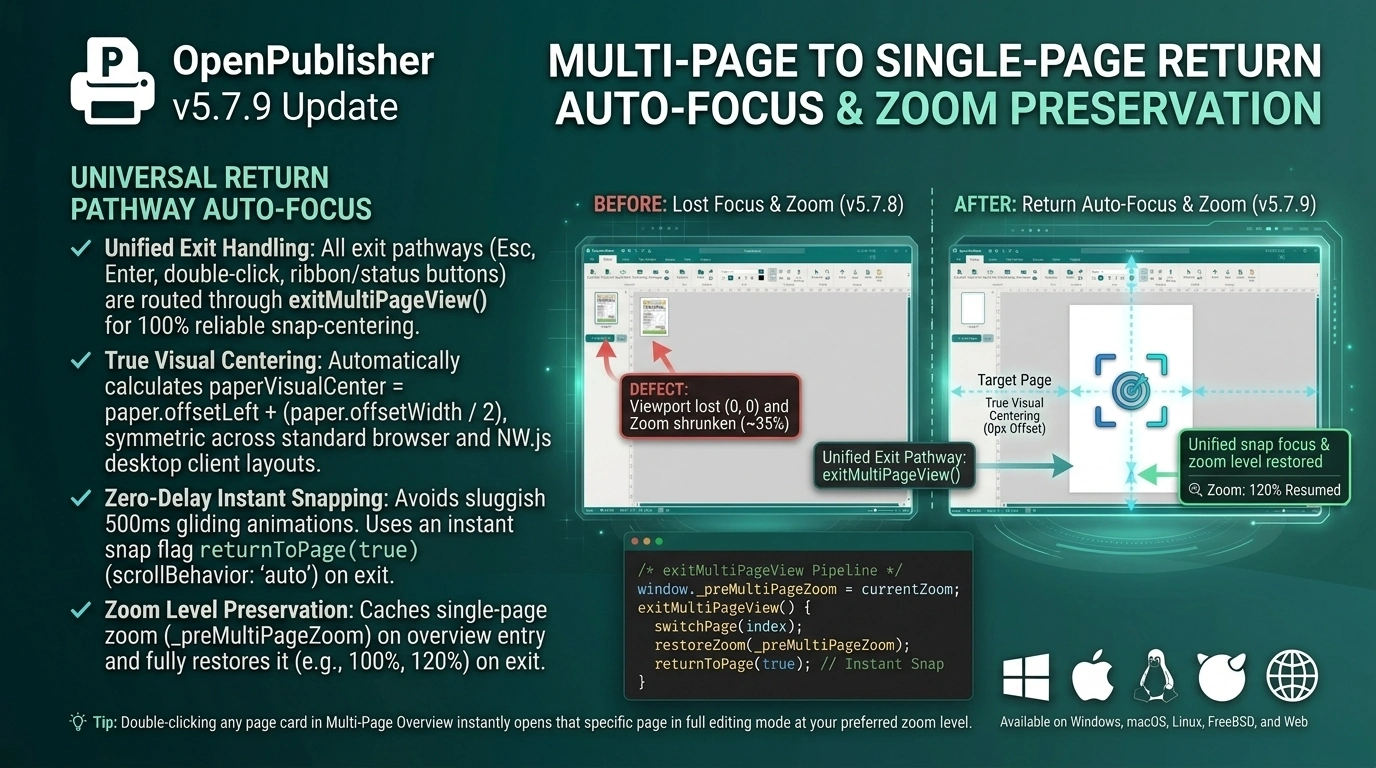
Exiting Multi-Page Overview immediately brings the chosen page into center focus while restoring prior editing zoom.
Universal Return Pathway Auto-Focus
Version 5.7.9 unified every exit pathway from Multi-Page Overview into an automated centering pipeline:
-
Unified Exit Handling: Whether leaving multi-page mode via the ribbon "Single" button, bottom status bar button, double-clicking a thumbnail slot, pressing Enter on a selected slot, pressing Esc, or calling focusPage(), execution flows through exitMultiPageView().
-
True Visual Centering: The centering formula dynamically calculates paperVisualCenter = paper.offsetLeft + (paper.offsetWidth / 2), centering the document symmetrically regardless of whether the app is running in standard browser flexbox or NW.js desktop client margin layouts.
-
Zero-Delay Instant Snapping: Added an instant flag to returnToPage(true) (scrollBehavior: 'auto'). On view transitions, this instantly positions the viewport over the page, eliminating sluggish 500ms gliding animations across empty pasteboard space.
-
Double-Shot Micro-Syncs: Scheduled secondary micro-syncs at 30ms and 100ms in exitMultiPageView() to absorb asynchronous desktop wrapper reflows, ensuring 0px horizontal center offset.
Zoom Level Preservation Across View Modes
In earlier versions, entering Multi-Page Overview overwrote the application zoom state with overview zoom (~35%), leaving the document shrunken when returning to single-page view:
-
Editing Zoom Caching: In enterMultiPageView(), the active zoom setting is preserved in window._preMultiPageZoom before switching to overview scale.
-
Automatic Restoration: In exitMultiPageView(), the prior zoom magnification (e.g. 100%, 120%, or 60%) is reinstated, with automatic updates dispatched to the ribbon zoom slider and percentage indicator.
Page Switch Execution Ordering & Overlay Guards
Internal function ordering was also hardened to guarantee visual stability:
-
Sequential Page Switching: In openPageInSingleMode(index), switchPage(index) is called prior to view mode switching, guaranteeing that active page elements serialize cleanly and the selected page content renders before the view changes.
-
Lazy Dialog Overlay Initialization: In ui/ui.js, DialogSystem.show() incorporates lazy initialization to prevent null overlay references if modals are triggered before explicit DOM setup.
Tip: Double-clicking any page card in Multi-Page Overview instantly opens that specific page in full editing mode at your preferred zoom level.