
Margin Guide Stacking Context & Dropdown Layering
In version 4.20.0, Open Publisher introduced crisp device-pixel margin guides using a fixed viewport overlay (#margin-guide-overlay) to bypass Chromium GPU downsampling during canvas zoom transforms. However, that overlay was originally assigned an arbitrary z-index: 9999, while Ribbon dropdown menus such as the Font Family picker used z-index: 6000. When opening dropdown menus that extended downward over the page, dotted teal margin lines visibly bled through the menu options. Version 4.20.2 recalibrates the entire workspace layer architecture to ensure absolute visual isolation.
📐Margin Guides Rendered Beneath Font Dropdown
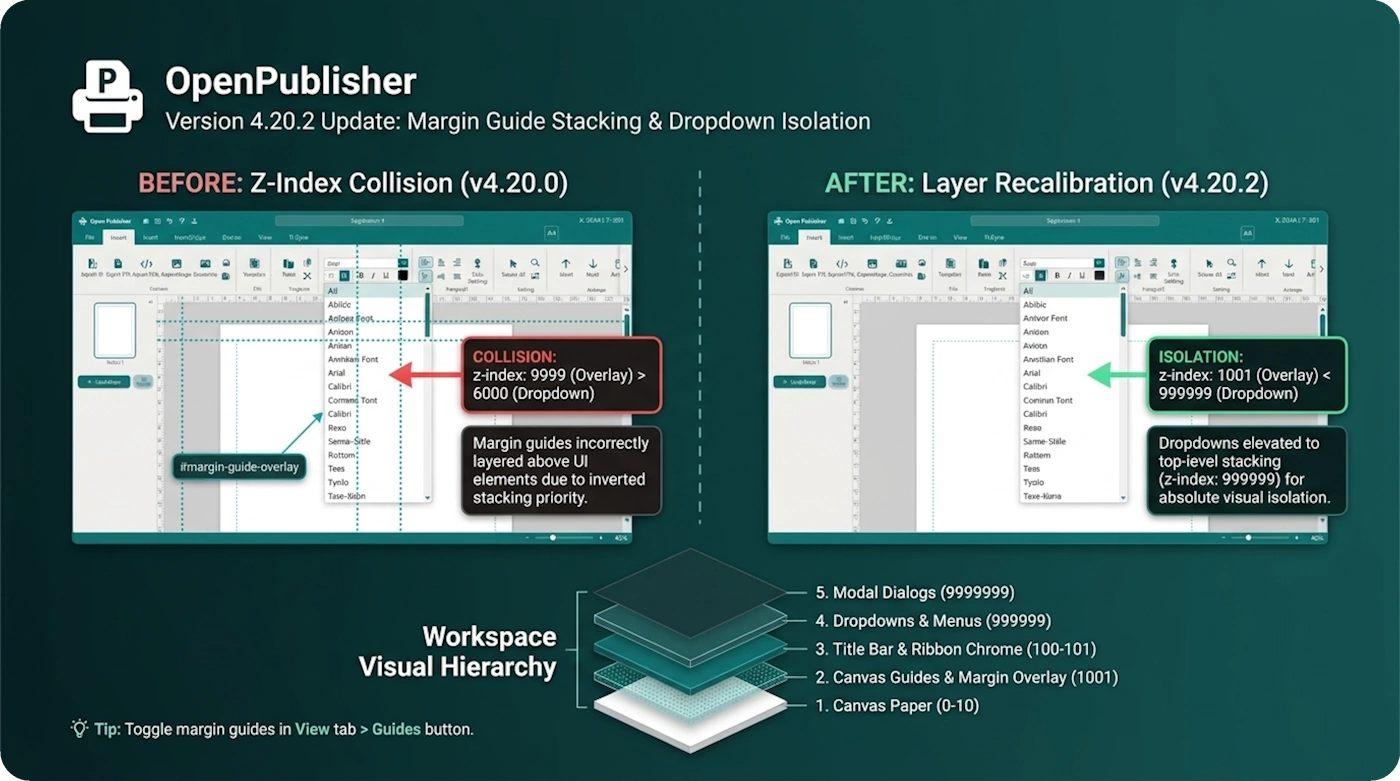 The dotted margin guide overlay floats cleanly above page elements while remaining subordinate to open Ribbon dropdowns.
Stacking Context Collision & Root Cause
The visual conflict occurred because both the margin overlay and ribbon dropdowns exist in viewport coordinate space:
-
Fixed Overlay Architecture: The margin overlay is a direct child of <body> with position: fixed, allowing it to draw 1-pixel guide lines sharply regardless of canvas zoom.
-
Stacking Priority Inversion: Because 9999 exceeded the dropdown container's 6000, the browser compositor layered the dotted margin border on top of the open font menu items.
-
Layer Recalibration: In canvas/canvas.js and style.css, the overlay was reduced to z-index: 1001. This aligns with canvas guide standards, floating cleanly above user elements (z-index: 10) while remaining strictly below UI chrome.
Authoritative Dropdown Elevation
To prevent future layering collisions, all dropdown elements were elevated to maximum UI priority:
-
Custom Dropdown Class: The base .custom-dropdown selector in style.css was raised to z-index: 999999 !important.
-
Inline Ribbon Dropdown Alignment: The ribbon handler in ui/sidebar-context.js explicitly sets menu.style.zIndex = '999999' during dropdown activation.
-
Theme Override Normalization: Color palettes, font size pickers, and zoom flyouts all inherit this top-level stacking contract.
Workspace Visual Hierarchy
Open Publisher now maintains a disciplined layer stack: Canvas Paper (0 - 10) → Canvas Guides & Margin Overlay (1001) → Title Bar & Ribbon Chrome (100 - 101) → Dropdowns & Menus (999999) → Modal Dialogs (9999999). This guarantees that interface menus remain completely unobstructed during intricate layout editing.
Tip: Margin guides can be quickly toggled on or off using the Guides button under the View tab on the main Ribbon.