
Unified Bulk Image Import & Multi-Page Automation
Publishing photo books, catalogs, newsletters, and localized publications often requires importing dozens or hundreds of image assets. Rather than forcing you to select and position pictures one by one, Open Publisher features a unified bulk image import pipeline. Users can choose multiple files via the Ribbon or drag and drop a batch of photos straight onto the canvas, with intelligent routing that automates both collage layouts and multi-page document generation.
🖼️Bulk Image Import Interactive Routing Dialog
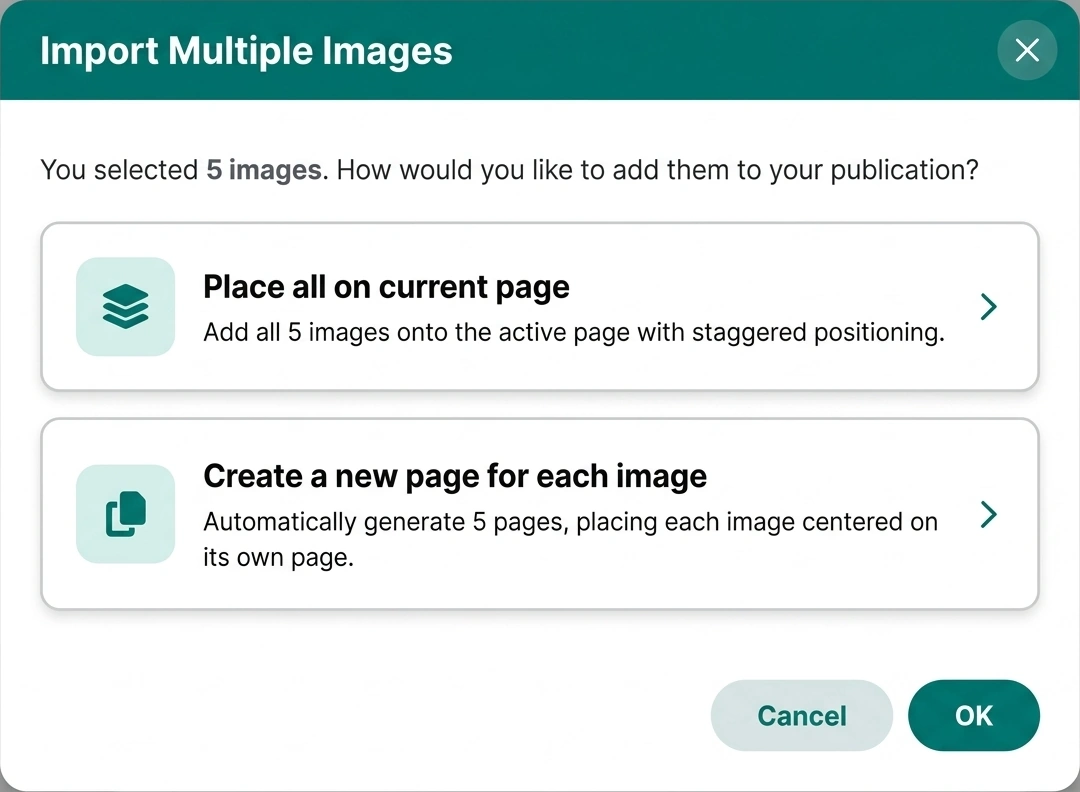 Interactive choice dialog prompting whether to place multiple images onto the current canvas or generate dedicated pages.
Dual Entry Points with Unified Handling
The bulk import engine unifies file picker workflows and desktop drag-and-drop operations:
-
Ribbon Picture Upload: The standard Insert Picture button on the Ribbon now supports multi-file selection. Hold Ctrl or Shift in your operating system's file browser to pick multiple PNG, JPEG, SVG, or WebP images simultaneously.
-
Desktop Drag and Drop: Select multiple pictures from Windows File Explorer, macOS Finder, or Linux file managers and drop them directly onto the publication canvas.
-
Centralized Pipeline: Both entry paths flow into window.handleBatchImageFiles, guaranteeing consistent processing, error handling, and memory management.
Smart Single vs. Batch Interception
The import pipeline evaluates file volume to provide the fastest user experience:
-
Single Image Fast Path: If only 1 image is selected or dropped, the app bypasses all dialog prompts, instantly placing the picture on your active page with zero extra clicks.
-
Multiple Image Choice Modal: When 2 or more images are detected, Open Publisher presents an interactive choice dialog with two distinct routing modes:
-
Option A - Place All on Current Page: Imports every image onto the active page, arranging them in an orderly staggered cascade with slight offsets so all elements remain visible and easily selectable.
-
Option B - Create New Page for Each Image: Generates a dedicated publication page for each picture automatically. Every image is scaled and centered within page margins, creating an instant photo book or presentation ready for print.
Deterministic Asynchronous Architecture
Handling dozens of high-resolution images requires strict sequence preservation:
-
Sequential Promise Loop: Images are processed via an async/await sequence, ensuring pages are created in exact file-order without race conditions or page scrambling.
-
Immediate Serialization: Each generated page is serialized to disk memory immediately upon image placement, preventing data loss during rapid page transitions.
-
Unified Undo Step: History recording is consolidated at the completion of the batch. A single Ctrl + Z cleanly reverts the entire import operation.
Tip: After generating pages automatically from images, you can use the Navigation Pane on the left to reorder, duplicate, or delete individual pages.