
Visual Grammar Engine & Contextual Proofing Underlines
While spell checkers flag invalid words, many writing mistakes involve valid words placed in improper grammatical contexts: confusing "there" with "their", typing duplicate words ("in the the box"), or mismatched indefinite articles ("an table"). Version 5.4.7 introduced a dedicated Visual Grammar & Contextual Proofing Engine powered by the W3C CSS Custom Highlight API (::highlight(grammar-error)). Operating alongside red spelling highlights, it renders crisp green wavy squiggly underlines (#27ae60) with zero bundled dictionary overhead.
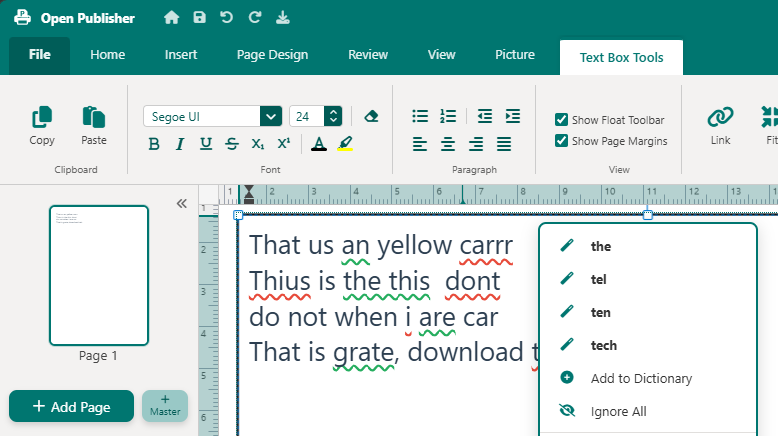 Green squiggly underlines highlight grammatical blunders, paired with a right-click explanation banner and 1-click replacement.
Dual Visual Proofing Architecture
Open Publisher maintains two distinct highlight registries simultaneously, clearly distinguishing vocabulary errors from contextual phrasing rules:
-
Spelling Highlights (Red): Flags unrecognized dictionary tokens using ::highlight(spelling-error) with red wavy underlines (#e74c3c).
-
Grammar Highlights (Green): Marks grammatical, contextual, and stylistic mistakes using ::highlight(grammar-error) with vibrant green wavy underlines (#27ae60).
-
Continuous Ink-Skipping Protection: Disables browser ink skipping (text-decoration-skip-ink: none !important) across all highlights, keeping green squigglies solid beneath descenders.
-
Rule-Aware Classification: classifyMatch() routes LanguageTool matches accurately, ensuring confused words, repeated words, and article mismatches display green rather than red.
Multi-Node DOM Range Mapping
Grammar rules frequently span across multiple words or cross text nodes separated by inline formatting (such as bold, italic, or font color spans). The proofing engine uses a robust DOM traversal algorithm:
-
TreeWalker Character Tracking: createRangeForOffsets() traverses text nodes cumulatively to map character offsets accurately across node boundaries.
-
Boundary Preservation: Constructs standard DOM Range objects without splitting nodes or altering document markup, preventing formatting corruption during composition.
Interactive Grammar Context Menu & Rule Ignoring
Right-clicking any green squiggly line presents an interactive grammar assistance card directly inside the canvas context menu:
-
Human-Readable Guidance Card: Displays a green explanation banner explaining the rule violation (e.g., "Did you mean 'their'?" or "Possible agreement error").
-
1-Click Suggestion Replacement: Clicking any replacement suggestion cleanly swaps the multi-word construct in the document, updates history undo/redo, and refreshes highlights in real time.
-
Persistent Rule Ignoring: Click "Ignore Rule" to silence specific stylistic warnings. Ignored rule IDs are stored in localStorage and persist across editing sessions.
-
Print Concealment: All green grammar decorations are hidden automatically during PDF exports and physical printing.
Tip: If you often use intentional sentence fragments for marketing headings, click "Ignore Rule" to suppress warning lines for that specific construction.
Isolated Word Grammar Underlines & Honorific Casing
Versions 5.8.7 and 5.9.7 refined the visual grammar engine to eliminate underline bleed. Green squiggly underlines now isolate exclusively beneath the affected words rather than stretching across spaces or trailing commas. Additionally, the grammar engine includes dedicated casing rules for honorific titles and abbreviations (such as Dr., Mrs., and Prof.), ensuring appropriate capitalization suggestions in formal correspondence.