
Mobile-Responsive Dashboard & Portrait Experience
While desktop monitors and landscape tablets provide ample workspace for browsing templates, visiting the Open Publisher dashboard on a smartphone in portrait orientation historically presented significant layout collisions. A fixed 250px vertical sidebar consumed up to 70% of narrow screens, crushing the template gallery into an unreadable vertical strip while desktop carousel arrow buttons floated directly over preview cards. Version 5.6.3 introduced a complete mobile-responsive redesign for the Startup Dashboard under modern media queries (@media (max-width: 768px)), transforming portrait mobile navigation into a fluid, app-like experience.
📱Mobile Portrait Dashboard with Horizontal Pill Navigation & 2-Tier Header
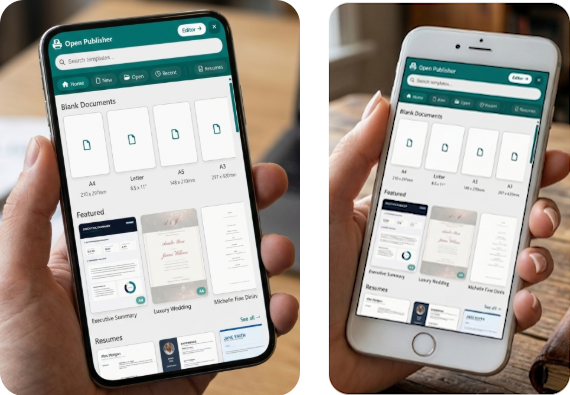
The mobile start screen presents edge-to-edge fullscreen modal geometry, touch-scrollable navigation chips, and an expansive search bar.
Two-Tier Header Architecture
Narrow mobile viewports cannot accommodate a 400px search input, branding logo, and multiple action buttons on a single horizontal row. Version 5.6.3 reorganizes header elements using CSS flexbox order:
-
Row 1 (Branding & Actions): Places the Open Publisher logo on the left (order: 1) and action buttons on the right (order: 2). The skip button automatically swaps its label from "Skip / Open Editor" on desktop to a compact "Editor" badge on mobile, avoiding text wrapping.
-
Row 2 (Full-Width Search): The search input (order: 3) expands to 100% width on the lower tier, providing a spacious touch target with clear placeholders for fast template discovery.
-
Safe Area Inset Respect: Fullscreen modal geometry honors device hardware notches and navigation bars (env(safe-area-inset-top)) on iOS Safari and Android Chrome.
Horizontal Touch-Scrollable Navigation Pills
Replacing the fixed 250px vertical sidebar with horizontal chips frees up the entire screen height for template content:
-
Compact Chip Bar: Converts navigation into an inline-flex pill chip row (max-height: 52px; overflow-x: auto;) featuring Home, New, Open, and Recent tabs alongside all publication categories.
-
Momentum Touch Scrolling: Equipped with native momentum scrolling (-webkit-overflow-scrolling: touch) and invisible scrollbars for a clean, app-like feel.
-
Active Theme Highlighting: Selected chips highlight in signature brand teal (var(--ui-theme-color)) with subtle pill elevation.
Touch Carousels & Adaptive 2-Column Grid
Template presentation adapts smoothly between quick horizontal carousels and full catalog exploration:
-
Natural Thumb Swiping: Bulky desktop circular arrow buttons are hidden on touch screens (display: none !important), enabling unobstructed horizontal thumb swiping across "Blank Documents" and "Featured" rows.
-
Adaptive 2-Column Grid: Expanding a category or entering a search query displays templates in a balanced 2-column card grid (repeat(2, 1fr)) with dynamic card width calculation.
-
Zero Desktop Regressions: Laptops and desktop screens above 768px retain the standard floating modal layout, 250px sidebar, and desktop drag controls.
Tip: You can swipe horizontally across template categories or tap any pill chip to instantly filter publication styles.