
Recent Documents Management, Pinning & Workspace Recovery
The Startup Dashboard serves as the central operational hub for Open Publisher, bridging new project creation with ongoing publication management. In busy design studios and production environments where authors manage dozens of concurrent newsletters, flyers, brochures, and advertisements, finding the exact publication required without hunting through operating system folder trees is critical. Open Publisher's Recent Documents system combines visual thumbnail previews, instant keyword filtering, priority document pinning, and automatic workspace state recovery.
📌Startup Dashboard Recent Documents Grid with Pinned Items
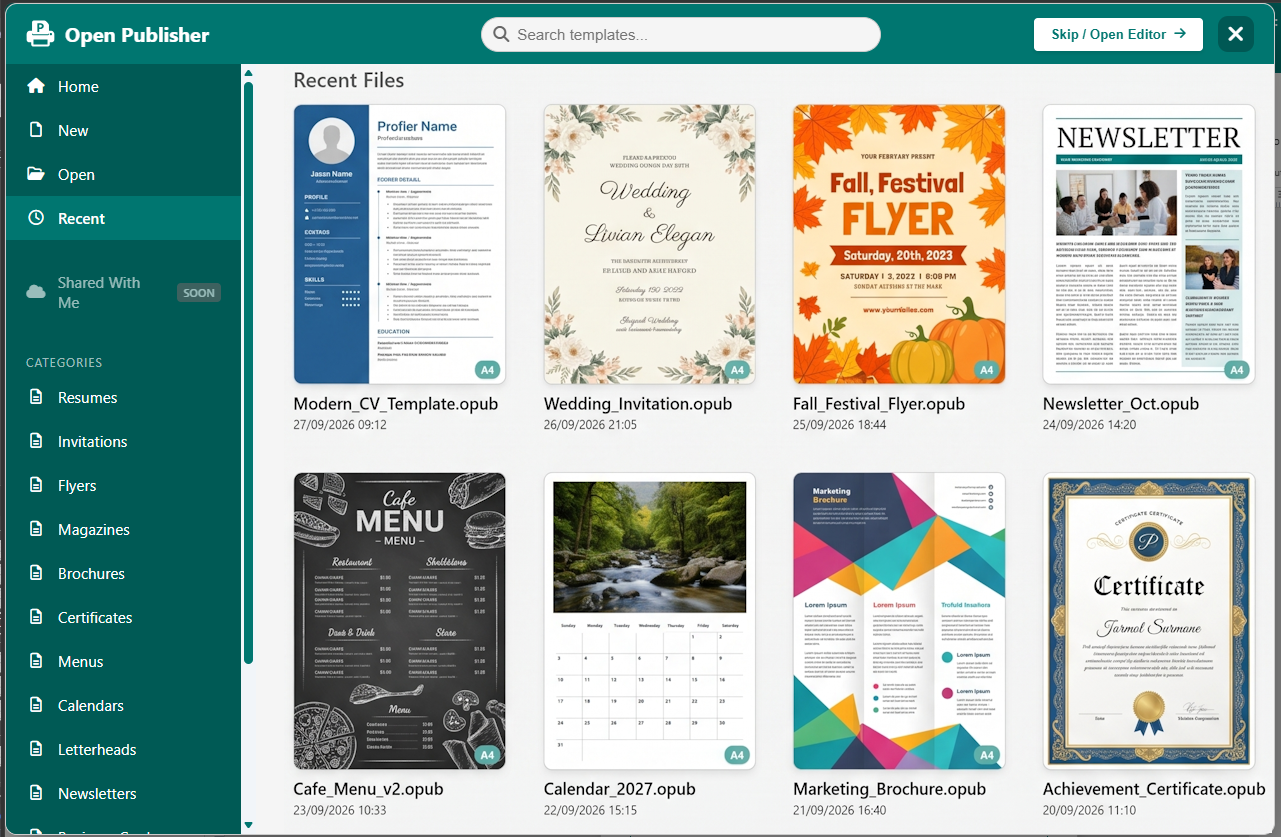
Manage recent publications with persistent pin toggles, live search filtering, and thumbnail previews.
The Recent Documents Grid
Every document opened or saved in Open Publisher is logged in the dashboard's local index:
-
Visual Thumbnail Cards: Each entry presents a high-resolution canvas snapshot of the document's front spread, alongside the publication title, last modified date, and page count.
-
Paper Format Badges: Standard badges (such as "A4 Portrait", "Letter", or "Custom") indicate document geometry at a glance.
-
Live Search Filter: A dedicated filter input lets you type document keywords to narrow down dozens of projects in milliseconds.
Document Pinning for Priority Access
Frequently accessed publications (such as weekly store circulars, school event programs, or master template designs) can be pinned to prevent them from dropping off the recent list. Clicking the pin icon on any document card locks it permanently to the top of the grid.
Seamless Workspace State Recovery
When reopening a publication from the Recent Documents grid, Open Publisher restores more than just the document content. It automatically re-establishes canvas zoom percentage, viewport scroll offsets, ruler origin coordinates, and active navigation panel selections, allowing you to resume work without reconfiguring your environment.
Tip: In desktop client wrappers, your pinned recent publications also appear in the operating system Taskbar Jump List and System Tray context menu.