
Multiple Copies per Sheet, Card & Label Imposition & Multi-Up Printing
Designing business cards, event badges, raffle tickets, and product labels is one of the most common applications of desktop publishing. However, printing these small items traditionally required users to manually copy and paste their artwork into awkward 10-up grids across an entire Letter or A4 page, making subsequent design edits tedious and error-prone. Version 5.8.1 delivered a complete Card & Label Sheet Imposition Engine, allowing designers to design a single card on a dedicated canvas and automatically print multiple copies per sheet with calibrated stock margins, cut marks, and duplex alignment.
📇Card & Label Sheet Imposition Dialog with Live SVG Sheet Preview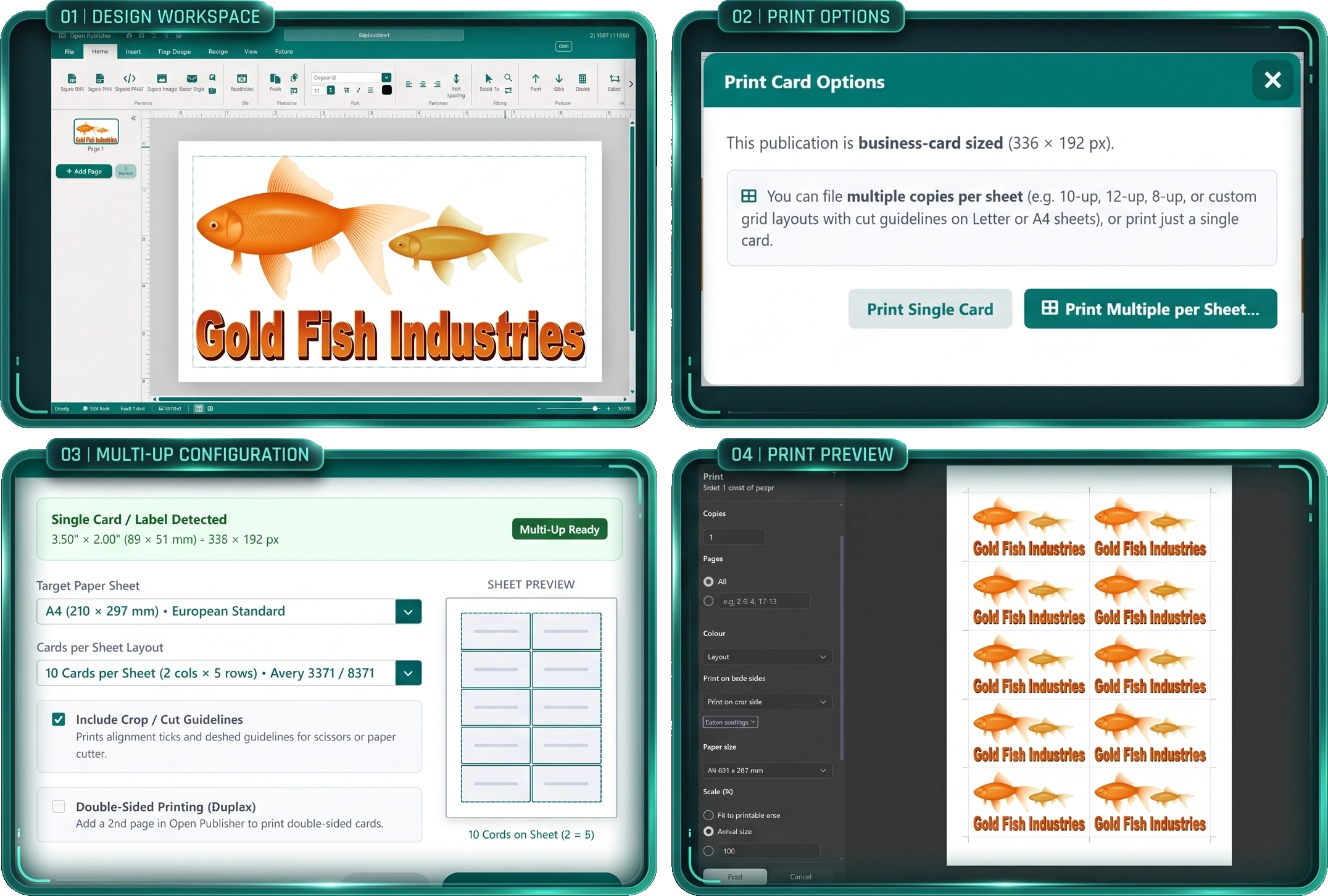
Single card designs tile automatically across standard Letter or A4 sheets with calibrated Avery stock margins and cut guides.
Single-Card Workflow & Automated Grid Imposition
The Card & Label Imposition engine (ui/modals/card-sheet-modal.js) liberates users from manual grid creation:
-
Dedicated Single-Card Canvas: Design cards on standard dimensions (such as 3.5 in x 2.0 in or 85 mm x 55 mm). All edits occur on a single focused card canvas.
-
Automated Grid Calculation: calculateCardGridLayout() calculates optimal sheet tiling across US Letter and A4 sheets, supporting 10-up (2 x 5), 12-up (2 x 6 and 3 x 4), 8-up (2 x 4), and customizable rows and columns.
-
Avery Perforated Stock Compatibility: The 10-up (2 x 5) layout on US Letter aligns directly with Avery 5371, 8371, and 8871 perforated business card stock (0.75 in side margins, 0.5 in top/bottom margins, 0 in gutter). For European A4 paper, a pre-calibrated 2 x 5 layout matches Avery C32011 / C32016 specifications.
-
High-Precision Cut Guidelines: Renders 14px hairline crop marks and dashed dividing lines outside card perimeters, enabling precise trimming with scissors or rotary paper cutters when using plain cardstock.
Double-Sided Duplex Alignment & Pre-Flight Detection
Multi-page card publications benefit from specialized duplex alignment and smart printing prompts:
-
Horizontally Mirrored Back Columns: When printing double-sided cards (Page 1 Front, Page 2 Back), the engine automatically mirrors column ordering on Sheet 2 (effectiveCol = cols - 1 - c). When the sheet is flipped along the long edge in the printer, front and back designs align with microscopic accuracy.
-
Context-Aware Ribbon Tool: Added a dedicated "Card Sheet" button in the File ribbon next to Print and Booklet. The button dynamically displays only when working on a card-sized publication, keeping standard document ribbons uncluttered.
-
Smart Pre-Flight Detection: When printing any card-sized document, Open Publisher automatically prompts the user whether to print a single card or customize and tile multiple copies per sheet.
-
Compact Progress Dialog: Enhanced the print preparation modal with a clean 380px to 420px width, dark mode styling, and informative status updates ("Arranging & rendering card sheet X of Y...").
Smart DTP Business Card Margins (1/8 in / 0.125 in)
Standard 0.5 in margins consume 50% of a 2-inch business card height, leaving an awkward, cramped text box. Version 5.8.1 implemented industry-standard safe margins:
-
Automatic Safe Margin Switching: Switching page format to BusinessCard automatically sets safe margins to 1/8 in (0.125 in / 12px at 96 DPI), matching commercial printing standards (Avery, VistaPrint, Moo). Switching back to A4 or Letter restores 0.5 in defaults.
-
Dedicated Margin Preset: Added "Card / Label (1/8 in)" preset to the Margins dropdown menu for instant application.
-
Print Image Pipeline Restoration: Added universal CORS header assignment (crossOrigin = 'anonymous') and layout fill normalization, ensuring cliparts, placeholders, and remote images appear crisply on imposed print sheets.
Tip: You can use the live SVG sheet preview in the Card Sheet dialog to audition different grid layouts and paper orientations before printing.