
Bulk Selection Transform Support & Clean Multi-Selection Overlay Engine
Designing intricate publications frequently requires manipulating clusters of elements: resizing a composite logo alongside its caption, rotating an angled diagram with its callout arrows, or scaling a complex product card arrangement. In earlier versions of Open Publisher, selecting multiple items permitted collective movement, but resizing or rotating in bulk was unsupported. Furthermore, individual dashed boxes remained visible around every selected element, creating cluttered overlapping outlines. Version 5.6.4 introduced complete Bulk Selection Transform Support paired with the Clean Multi-Selection Overlay Engine.
🔲Unified Group Selection Box with 8 Resize Handles & Orbit Rotate Stem
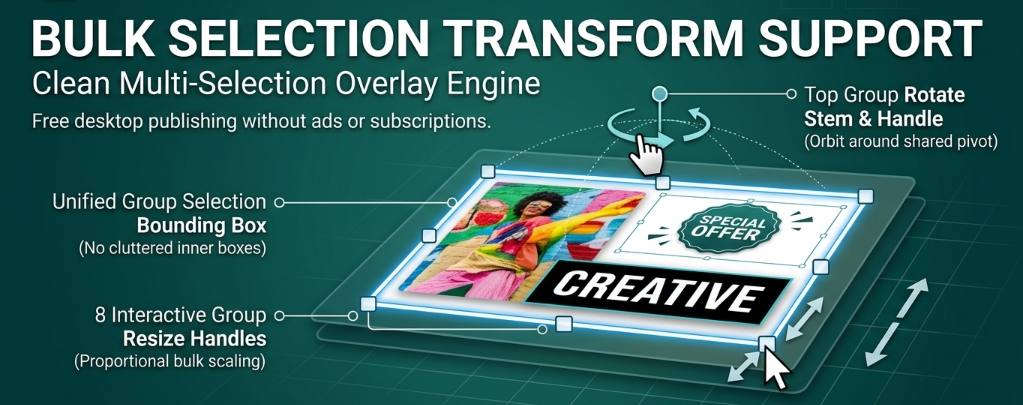
Multiple elements are enclosed in a single master bounding box with collective resize handles and a top rotation stem.
Unified Master Bounding Box Architecture
When two or more elements are selected via marquee drag or Ctrl-clicking, Open Publisher computes collective geometric boundaries:
-
Projected Corner Calculation: Evaluates the unrotated and rotated corners of all active elements in paper space, establishing an exact enclosing master rectangle (#group-selection-overlay).
-
Suppression of Inner Dashed Boxes: Redundant individual selection rectangles are suppressed during multi-selection, presenting a crisp, unified outline without visual clutter.
-
In-Place DOM Synchronization: Selection handles maintain persistent DOM identity, updating positions at 60 FPS without tearing or node destruction during interaction.
Proportional Multi-Element Resizing
Dragging any of the eight collective resize handles (nw, n, ne, e, se, s, sw, w) scales the entire cluster:
-
Relative Position Scaling: Calculates scale factors (factorX, factorY) from the group origin, scaling each element's width, height, and offset to preserve exact relative spacing.
-
Modifier Keys: Hold Shift to constrain group scaling to the cluster's original aspect ratio, or hold Ctrl (Cmd on macOS) to resize outward symmetrically from the group center.
-
Smart Component Adaptation: Image frames scale preview dimensions, text boxes reflow content, and smart arrow geometry recalculates proportionally.
Circular Orbit Rotation Around Collective Center
The top rotation stem allows rotating entire layouts with intuitive pivot physics:
-
Group Center Orbit: Dragging the top rotate handle calculates angular delta (deltaDeg) around the collective centroid (cx, cy), orbiting each element's center point in real time.
-
Individual Rotation Updating: Simultaneously updates each object's individual CSS transform angle, preserving flips and orientations.
-
Single-Keystroke History Undo: Every bulk transform commits atomic pre- and post-interaction undo snapshots, allowing instant rollback with Ctrl + Z.
Tip: Group elements visually by selecting them together, then drag the top green handle to orbit the entire group as a unified graphic.