
Image Drag-Through Mirroring & Preview Fidelity
Reflecting images, decorative motifs, and illustrations is a cornerstone of symmetrical document layout. While users can click "Flip Horizontal" or "Flip Vertical" in the ribbon, the most natural method is dragging an element's resize handle directly through itself to invert it. Earlier revisions had inadvertently disabled this gesture with minimum dimension clamping and suffered from preview letterboxing when images were stretched non-uniformly. Version 5.8.4 restored full four-way drag-through mirroring, continuous reversible tracking, and live preview fidelity.
🪞Interactive Drag-Through Resize Mirroring Across Horizontal Axis
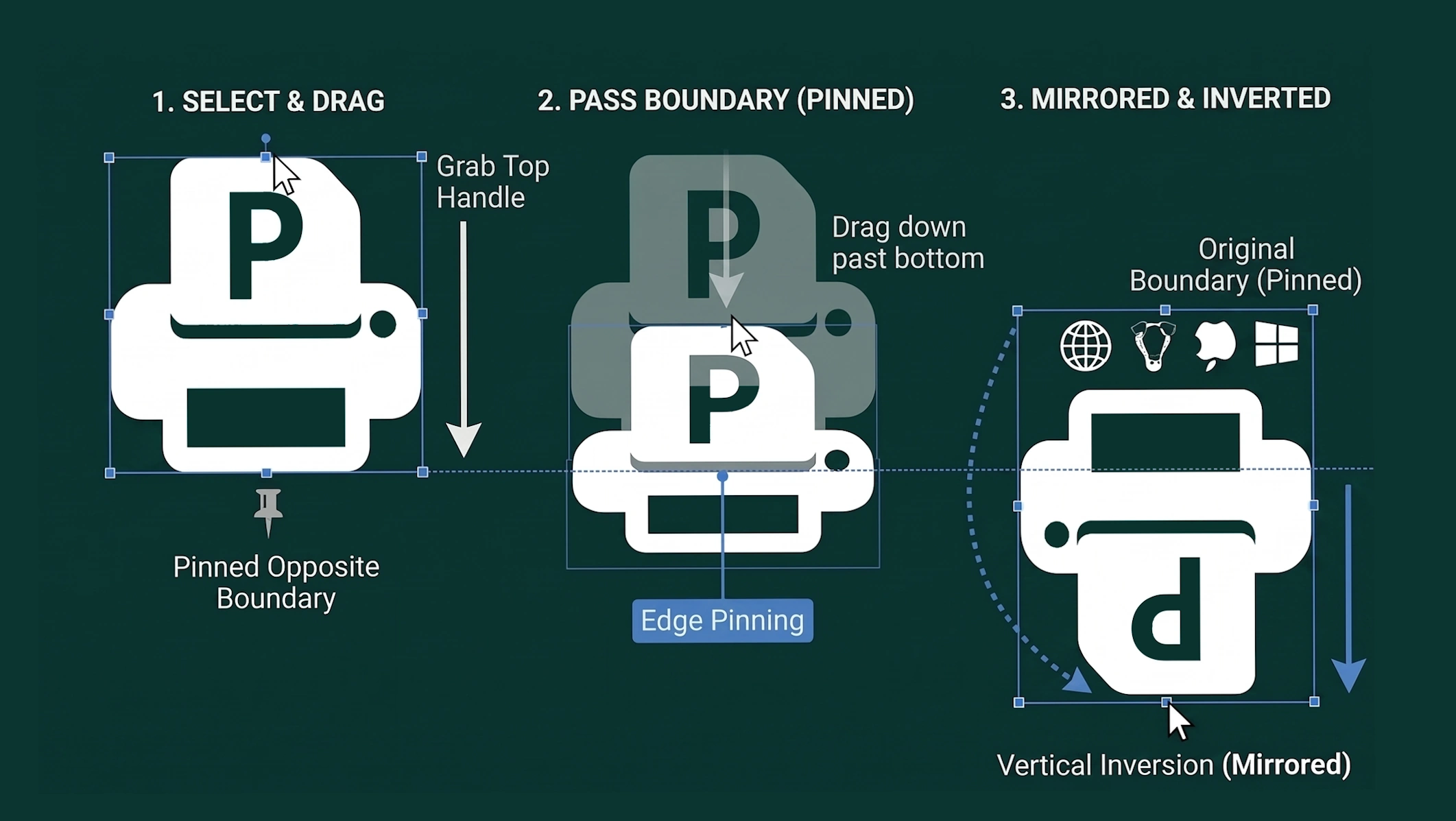
Dragging a handle past its opposite boundary smoothly inverts the graphic with rotation-aware edge pinning.
Restoration of Four-Way Drag-Through Mirroring
Version 5.8.4 decoupled layout safety guards from interactive graphic transforms:
-
Signed Dimension Processing: Clamping checks now verify canMirror = !state.cropMode && !isTable && !isArrow. Elements permitted to mirror allow raw dimensions to transition through zero into negative numbers during dragging. Physical element dimensions are assigned via Math.abs(rawW), while negative coordinates toggle data-scaleX: -1 and data-scaleY: -1.
-
Multi-Directional Support: Dragging an East handle left past West inverts horizontal scale; dragging West right past East inverts it symmetrically. Pulling South up past North inverts vertical scale, and corner handles (nw, ne, se, sw) mirror across both axes simultaneously.
-
Continuous Reversible Drag Tracking: Users can drag through the inversion point to mirror, then drag back across zero to un-mirror in the same continuous mouse gesture without coordinate jitter.
Rotation-Aware Pivot & Anchor Geometry
Mirroring operates accurately on rotated objects across any angle:
-
Rotated Basis Vectors: The rotation-aware engine utilizes local unit basis vectors (u, v) to calculate fixed-edge anchors. When dragging past an opposing edge at arbitrary angles (such as 30 deg or 45 deg), the opposite boundary remains strictly pinned in place while the active handle extends into mirrored space.
-
Aspect-Ratio Lock Compatibility: When holding Shift or when data-aspect-lock="true", the engine computes the dominant scale magnitude while preserving signed coordinate direction, enabling proportional scaling and mirroring simultaneously.
Preview Stretch Elimination & Isolation Safeguards
Thumbnail navigation and layout components were hardened:
-
Fill Styling for Previews: Updated page thumbnail styling to respect object-fit: fill, ensuring non-uniform stretching on the canvas is faithfully displayed in navigation previews without letterbox bars.
-
Center Transform Origins: Configured transform-origin: center center across preview renderers, allowing thumbnail graphics to mirror in place around their own center rather than clipping into negative coordinate space.
-
Smart Arrow & Table Safeguards: Smart arrows are explicitly exempted from drag-through inversion to protect stroke geometries and pointer heads, enforcing a 10px minimum boundary. Table containers similarly enforce physical content constraints.
Tip: You can quickly duplicate and mirror decorative corner flourishes by holding Ctrl while dragging an element, then pulling the outer handle through itself.