
Image Rounded Corners & Crop-to-Shape Complete Engine Fix
Creative document design often calls for non-rectangular image framing: softening photos with gentle rounded corners, cropping team portraits into circular avatars, or masking promotional callouts into stars, hexagons, and speech bubbles. In earlier builds, the "Crop to Shape" dialog suffered from a critical JavaScript error that rendered all shape buttons inert, while the physical print spooler stripped CSS clip paths, reverting curved graphics to hard rectangular boxes. Version 5.6.9 delivered a complete architectural overhaul, activating instant shape cropping, right-click context menu integration, and full vector clipping across printing, PDF exports, and saves.
✂️Interactive Crop to Shape Modal with 19 Geometric Presets
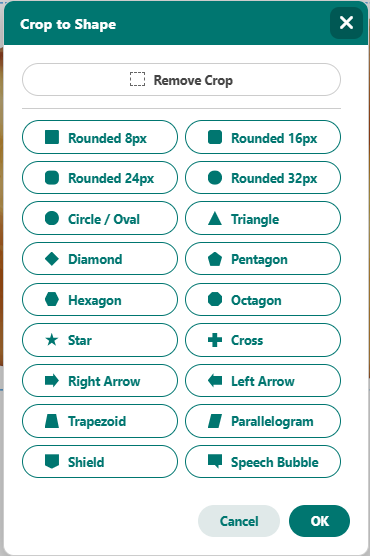
Clicking any geometric preset crops the selected photo immediately, preserving transparency and shadow boundaries.
Interactive Crop to Shape Modal & Context Menu
Version 5.6.9 resolved modal input reference issues and streamlined shape application:
-
Direct Shape Execution: window.applyCropShape(shape) applies clipPath, -webkit-clip-path, and borderRadius directly to both the image and container wrapper, closing the modal smoothly upon card selection.
-
19 Handcrafted Shape Presets: Supports circles, ellipses, teardrops, diamonds, triangles, pentagons, hexagons, octagons, 4-point to 8-point stars, banners, and speech callouts.
-
Context Menu Integration: Added "Crop to Shape" directly to the right-click image menu in ui/menus.js alongside "Rounded Corners" (None, 8px, 16px, 24px, 32px) and "Crop Image".
Vector Print Engine Geometry Clipping
Browser print engines and html2canvas historically ignored CSS clip paths during rasterization. Open Publisher incorporates a vector path clipper in extensions/print-engine.js:
-
Path Parser: Decomposes inset(0 round Xpx), circle(...), ellipse(...), and polygon coordinates in pixels and percentages.
-
Raster Canvas Clipping: Clips the offscreen raster context prior to drawing pixels, ensuring areas outside the shape mask remain transparent.
-
Natural Drop Shadow Radiation: Because transparency is preserved outside the shape, drop shadows radiate naturally from the curved or angled contour rather than square box edges.
Full History & Serialization Parity
Shape masks and corner radii are serialized into data.clipPath, data.borderRadius, and data-rounded-corners within the .opub file format, restoring accurately across page navigation, saves, and undo/redo operations.
Tip: Right-click any photo and select Crop to Shape -> Circle to create professional circular portrait badges in seconds.