
Picture Tools Image Glow & Drop Shadow Print Rendering Fidelity
Visual styling effects such as soft drop shadows and radiant outer glows give photographs, illustrations, and imported artwork depth and emphasis on the printed page. In desktop publishing, these effects must render with identical fidelity whether viewed on screen, exported to high-resolution PDF, or sent to a physical desktop printer. Earlier releases experienced an issue where image drop shadows and glows applied via the Picture Tools ribbon displayed accurately on the interactive editor canvas, but disappeared or clipped on physical prints and PDF exports. Version 5.7.3 resolved this across both print pipelines, restoring complete visual parity across HTML5 Canvas 2D rasterization and the native desktop print spooler DOM.
🌟Picture Tools Glow & Drop Shadow Print Preview Comparison
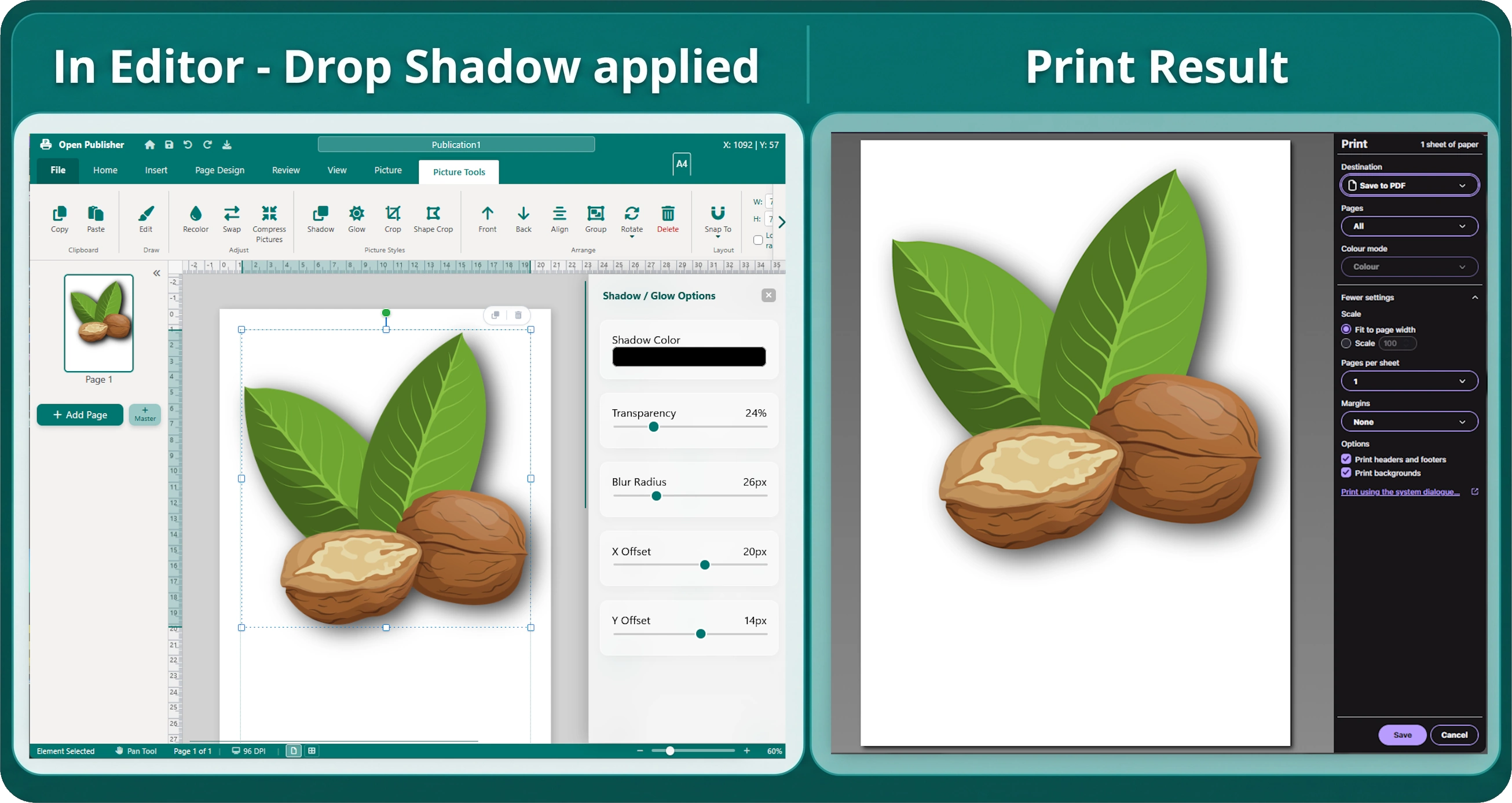 Images styled with vibrant outer glow and deep drop shadows retain full blur radiuses and color fidelity on print and PDF outputs.
CSS Filter Color Parentheses Truncation in bakeImageForPrint()
The primary cause of missing shadow and glow effects on printed documents was traced to regular expression parsing in the image pre-baking pipeline:
-
The Single-Level Regex Flaw: In extensions/print-engine.js, bakeImageForPrint() used a shallow pattern (/drop-shadow\(([^)]+)\)/g) to extract and scale drop shadow parameters for 300 DPI canvas baking.
-
Premature Termination on rgba() Colors: Modern browsers serialize computed CSS filter colors using functional notation containing inner parentheses (such as rgba(0, 191, 255, 0.8)). The shallow regex terminated on the first closing parenthesis, creating malformed CSS strings lacking an outer closing parenthesis.
-
Silent Canvas Context Rejection: When assigned malformed filter strings, the HTML5 Canvas 2D context (ctx.filter) silently rejected the syntax and reverted to none, causing shadows and glows to vanish completely from the baked image.
-
Balanced Nested Parsing: The parser was upgraded to balanced nested parentheses matching (/drop-shadow\(((?:[^)(]+|\([^)(]*\))*)\)/g). This captures complete multi-token color structures, allowing blur radiuses and offsets to be scaled accurately to print resolutions.
History Serialization & Filter Consolidation
Ensuring filters persist across document navigation and auto-saves required synchronizing DOM layers:
-
Multi-Element Inspection: In core/history.js, serializeCurrentPage() was enhanced to inspect and combine filter directives across img.style.filter, content.style.filter, and el.style.filter.
-
Sanitizing Obsolete Tokens: Rogue none filter tokens are stripped during serialization, and the consolidated filter definition is saved into both data.filter and data.imgStyle.filter.
-
Ribbon Action Cleanliness: Picture Tools ribbon handlers (ContextRibbonActions.addGlow and addDropShadow) clean obsolete tokens before appending new effects, triggering immediate undo/redo state capture.
Container Overflow Unclipping & Desktop Spooler DOM Parity
Drop shadow blurs and glowing halos naturally radiate beyond the rectangular perimeter of the source image:
-
Unclipped Element Containers: In core/pages.js and buildPrintPageDOM(), container elements (elDiv, cropDiv, and .element-content) explicitly apply overflow: visible and contain: none when drop shadows or glow effects are present.
-
Native Desktop Spooler DOM Parity: The NW.js desktop native spooler pipeline in buildPrintDOM() and io/file-io.js extracts serialized filters directly from state objects, applies them to img.style.filter, and unclips container wrappers.
-
Automated Pixel Verification: Automated raster test suites verify that glowing images generate over 29,000 radiant pixels and drop-shadowed images produce over 6,600 realistic shadow pixels without edge truncation.
Tip: You can layer multiple Picture Tools effects (such as combining a soft black drop shadow with rounded corners) and preview the exact print output anytime in the Document Presentation Preview.
Rounded Corner Contour Shadow Baking & WordArt Support
Version 5.10.2 and 5.10.4 expanded the print pipeline to support rounded corner images and Beta WordArt drop shadows. By decoupling the shadow rasterization into an isolated Canvas 2D layer, Open Publisher bakes smooth, contour-following drop shadows directly beneath curved image borders and styled WordArt glyphs, preventing unsightly white bounding boxes on print outputs.