
Webview Guest Bridge Detection & Download Button Suppression
Native client architecture often utilizes specialized wrapper windows running host containers that embed web applications inside isolated Chromium webview guest tags (<webview id="app-view">). In this guest context, Node and NW namespaces are not exposed directly to the page, and the bridge connection attaches asynchronously several hundred milliseconds after boot. Version 5.7.2 resolved the timing gap where download buttons momentarily flashed or persisted inside native client apps, introducing reactive property traps, computed style recognition, and an 800ms settling delay defense.
🌉Webview Guest Bridge Architecture & Button Suppression Handshake
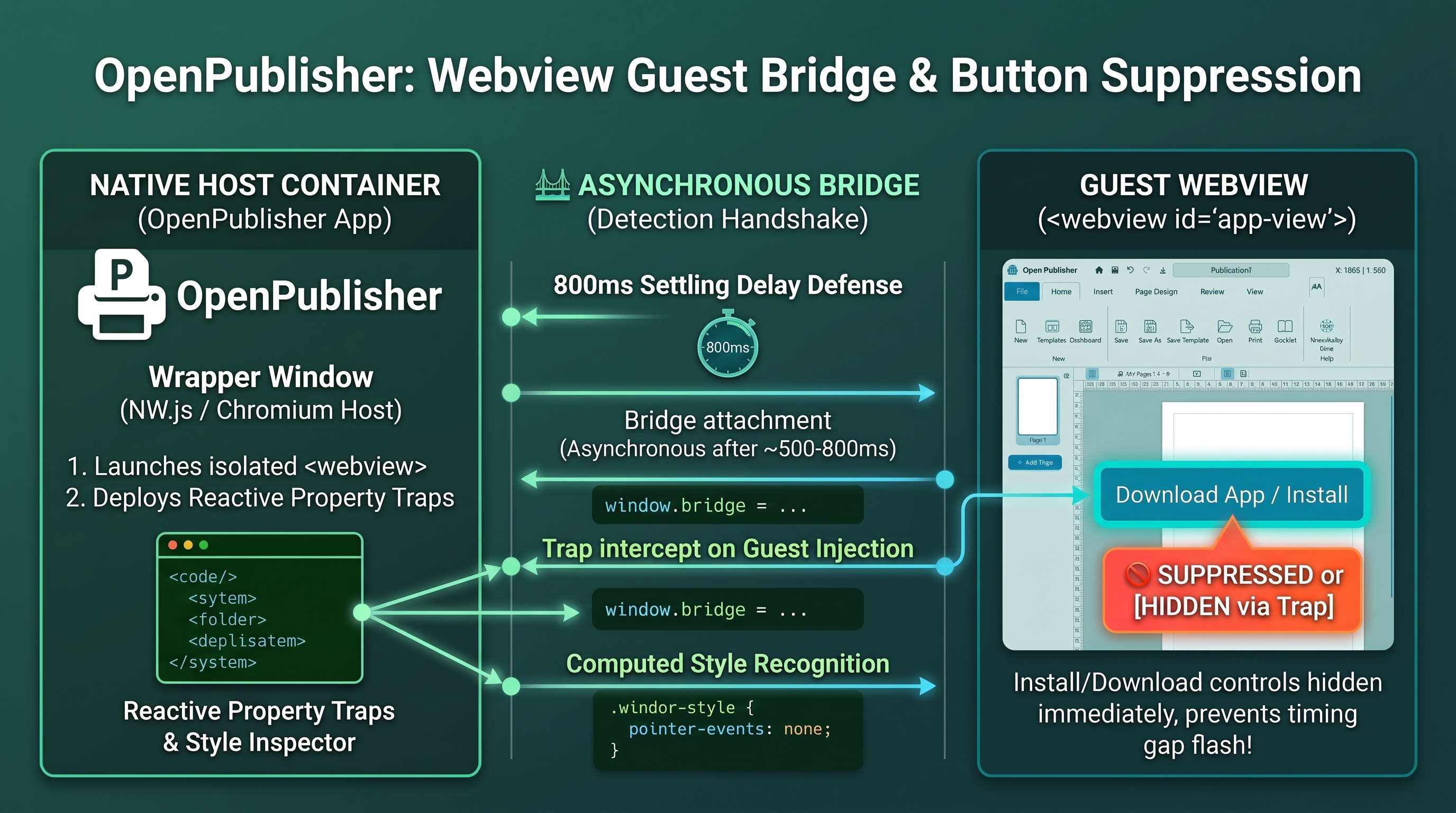 Reactive property traps intercept wrapper bridge attachment, suppressing install controls immediately upon guest injection.
The Asynchronous Webview Timing Gap
In guest webviews, standard checks fail during initial script execution because host bridge scripts attach asynchronously upon contentload:
-
Isolated Guest Context: Inside the webview, typeof nw is undefined and navigator.userAgent mimics standard web browsers.
-
Timing Discrepancy: UI scripts initialize within 0 to 150ms of DOM load, whereas the host wrapper injection executes after a 500ms handshake interval. Without reactive listening, buttons evaluated to browser mode before the bridge attached.
Reactive Property Traps & Setter Interceptors
Version 5.7.2 defined property traps (Object.defineProperty) in the <head> script of index.html:
-
Injected Property Interception: Traps assignments to window._opBridgeActive, window.desktopIPC, startDesktopSaveAnimation, and extractDocumentSnapshot.
-
Immediate Suppression Trigger: As soon as the host wrapper assigns any bridge property, markAsDesktopClient() fires, applying .is-desktop-app and invoking hideInstallButtons().
-
Save Document Setter Interception: In extensions/system-patches.js, reassignment of window.saveDocument triggers immediate client tagging.
Computed Styles, macOS Themes & Settling Delay
Multi-layer defense mechanisms ensure bulletproof detection across all operating systems:
-
Wrapper Computed Style Inspection: Detects wrapper-injected CSS styling on #coord-display (zIndex === '999999').
-
macOS Theme Defense: On macOS client machines, the wrapper applies body.mac-theme, which activates explicit CSS suppression rules for download buttons.
-
800ms Settling Delay & Heartbeat: Desktop browsers wait 800ms before revealing download buttons, allowing adequate time for native wrappers to complete handshakes, backed by a 7.5-second polling heartbeat.
Tip: These multi-layered defenses guarantee that installed native apps remain clean and uncluttered while web visitors always see direct download options.