
Ruler Selection Span Markers & Smooth Real-Time Cursor Position Indicators
Precision alignment is the cornerstone of desktop publishing. Whether placing a banner image, sizing a three-column article text frame, or aligning logo marks to margins, designers rely on horizontal and vertical rulers to verify object dimensions and mouse positions. Earlier builds featured basic ruler highlights that suffered from coordinate drift, missed multi-selections, and lacked cursor position feedback. Version 5.7.10 introduced an overhauled ruler tracking engine featuring high-contrast selection span markers, lighter marquee feedback, and compositor-driven cursor indicators that track the pointer with zero lag.
📏Dual-Ruler Selection Spans & Real-Time Hairline Cursor Pips
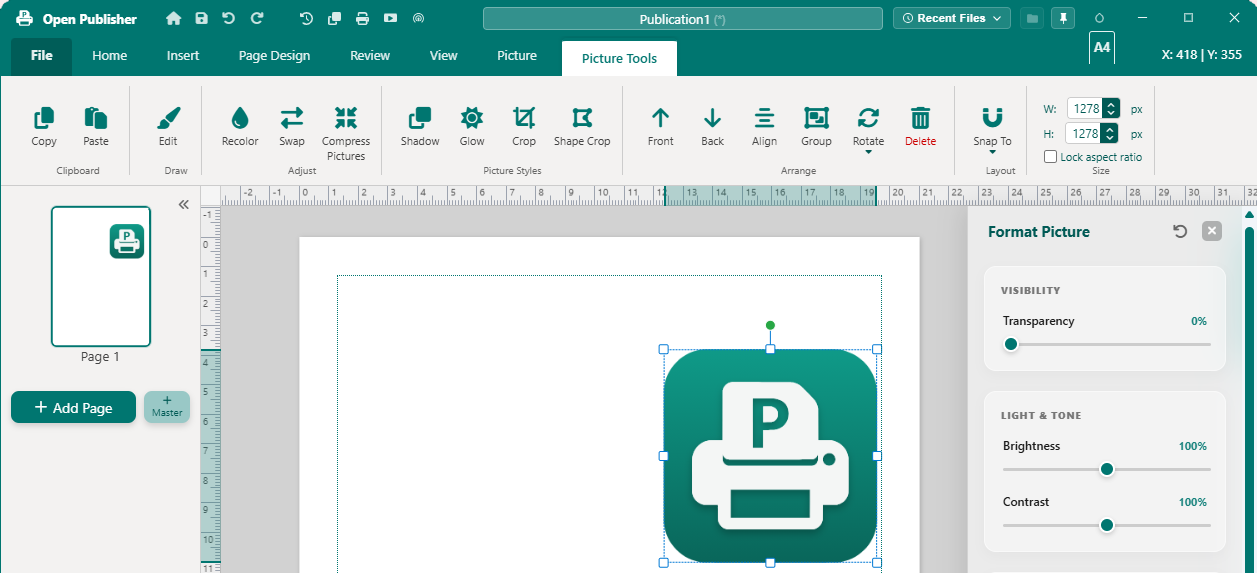 The top and left rulers highlight exact object coverage while 1px cursor hairlines follow the mouse in real time.
Dual-Ruler Selection Span Highlights
Version 5.7.10 replaced detached body overlays with markers embedded directly inside the ruler containers:
-
Direct Ruler Nesting: Selection and cursor markers are injected directly into #ruler-h and #ruler-v. Because rulers use overflow: hidden, marker coordinates map simply as targetRect - rulerRect without requiring manual clamping math.
-
Vertical Ruler Highlight Restoration: Resolved a legacy bug where the left vertical ruler failed to highlight selected objects due to a shared visibility cache key between horizontal and vertical markers. Both rulers now update independently.
-
Multi-Selection Union Bounding: When multiple elements are selected (Ctrl or Shift click), the rulers display the combined bounding span covering all selected objects.
-
Lighter Marquee Span Feedback: While dragging a marquee selection box across the canvas, the rulers display a lighter 12% tint with delicate 1px border edges (.is-marquee), clearly distinguishing drag selection from committed objects.
Smooth Compositor-Driven Cursor Tracking
Earlier cursor tracking prototypes felt sluggish and trailed behind the mouse cursor because layout coordinates were read repeatedly on every mouse event. Version 5.7.10 engineered a high-performance tracking loop:
-
Zero Layout Reads During Mousemove: Geometry for rulers, viewport, and canvas is sampled and cached once per animation frame (requestAnimationFrame). Mousemove handlers execute zero layout reads.
-
GPU Compositor Positioning: Hairlines are translated via transform: translate3d(...) with will-change: transform and transition: none, rendering position updates instantly on the GPU.
-
Hairline with Triangular Pointer Pip: The indicator features a 1px theme-colored hairline plus a subtle 3px triangular pointer pip at the inner edge of the ruler pointing inward toward the page.
-
Clean Departure Behavior: Cursor markers hide automatically when the pointer leaves the workspace or window focus is lost. Markers also cleanly suppress in Multi-Page Overview mode.
Ruler Guide Deletion & Context Menu Fixes
Interaction with ruler guides was also refined: dragging an existing guide back onto either ruler now cleanly deletes the guide rather than sticking to the paper edge. Additionally, right-clicking a ruler to switch measurement units (inches, centimeters, millimeters, points, pixels) no longer creates accidental ghost guides.
Tip: You can right-click anywhere on the horizontal or vertical ruler to switch between Inches, Centimeters, Millimeters, Points, and Pixels.